Featured Post

Ultimate Guide to Building a Budget-Friendly Intel Gaming PC: Best Components for Every Gamer [Extreme Low Budget Gaming Edition August 2024]

Building the Best Budget Gaming PC: A Complete Guide Are you looking to build a budget gaming PC without compromising on performance? Look n...

Top Microsoft Edge Extensions to Boost Your Productivity in 2023

In the ever-evolving world of web browsers, Microsoft Edge has carved out a niche for itself with its speed, lightweight design, and unique features. But did you know that you can further enhance your Edge experience with extensions? In this post, we’ll explore some of the best Microsoft Edge extensions you should consider installing in 2023.

1. Guard.io

Guard.io is a security extension that protects you from trackers and cyber-attacks while browsing the web. It works similarly to an antivirus, making it a must-have for safe and secure browsing.


2. Surfshark VPN, NordVPN, ZenMate, hide.me 

These VPN extensions available on the Edge Add-ons store can help protect your privacy and secure your data by creating a private network from a public internet connection.


3. Improve YouTube 

This extension enhances your YouTube experience by removing ads and annotations in videos, defaulting to your favorite quality format, disabling autoplay and preloading, and more.


4. AdBlock Plus 

AdBlock Plus is a beta software that blocks advertising for a commercial-free browsing experience. It’s one of the big names in making sure your online experience is as ad-free as possible.


5. Ghostery

Ghostery is a privacy extension that finds and blocks any tracking technology on the pages you visit. It also speeds up your web browsing experience on Edge.


Remember, while extensions can significantly enhance your browsing experience, having too many can slow down your browser. So, choose the ones that best suit your needs, and happy browsing!

Laptop Buying Guide 2023: Making Informed Choices


Are you in the market for a laptop but feeling overwhelmed by the vast array of options and technical jargon? Worry not! In this guide, we break down what to avoid and what to look for when considering a laptop purchase in 2023. Let's make your laptop shopping experience a breeze.


What Not to Buy Below 50K:

Processors:

Intel: 8th/9th/10th/11th Generation

AMD: Ryzen 4000/5000 Series

RAM:

8/16 DDR3 or 8GB DDR4/LPDDR4 (non-expandable)

Storage:

512GB/1TB Hard Disk Drive & SATA SSD

Display:

Non-IPS, Non-Full HD, Non-Anti Glare

Graphics:

Integrated as Dedicated: Intel 610/620/630 UHD Graphics

Exception:

Intel i5 11th Generation H Series.


Include- All mentions of the above segment.

Not Recommended Below 60K for:

Keyboard:

Non-Backlit

Display:

14 inches Screen Size

Processor:

U Series in Intel 12th Generation

Graphics:

Dedicated: Nvidia MX 150/250, Nvidia GT 710/720/730

Ports:

LAN Missing, Type C Missing


Include- All mentions of the above segment.

Steer Clear Below 80K From:

Graphics:

Nvidia MX 350/450, AMD RX 65400M/6500M, Nvidia GeForce GTX 1630/1650 (45/50/60 watt), AMD Radeon R9 390X

Processor:

U Series in AMD Ryzen 7000


Include- All mentions of the above segment.

Recommended Features:

RAM:

16GB DDR4/DDR5, Expendable

Storage:

512/1TB M.2 NVME Gen 3 or Gen 4 SSD

Display:

Higher Refresh Rates (90/120/144/240/360/420Hz), Panton Validated/ True Tone/HDR/72% NTSC/100% sRGB/DCI P3/ Dolby Vision/ REC Supported, IPS/OLED FHD/1.4K/2.K/3K/4K.

Processor:

P/H/HX/HK Series in Intel 12/13th Generation.

Graphics:

Nvidia GeForce GTX 1650/1650 Super, 1650Ti (75/85/95/120/140 watt), Nvidia GeForce RTX 3050/3050Ti/3050 6GB/3060/4050/4060 (60/75/80/85/95/120/140 watt).

Ports:

Thunderbolt, USB 3.1/3.2/3.1 Gen 1/ 3.1 Gen 2/3.2/ 3.2 Gen 1/3.2 Gen 2/ 4.0, HDMI 2.1.

Other Features:

Intel EVO, G/F Sync


Stay informed, choose wisely, and make the best investment for your computing needs in 2023! For more tech insights and reviews, keep following AnswerPickerTech.

Disclaimer: Prices and product availability may vary based on location and retailer.

WhatsApp’s New User Interface: A Look at the Upcoming Changes


 WhatsApp is currently developing an updated interface for its Android app, featuring a bottom navigation bar, to offer a more user-friendly experience. This redesign comes as a direct result of user feedback, who have been expressing their desire for an interface overhaul due to its outdated nature.

The new UI appears to be similar to WhatsApp for iOS. It will make it easier for users to switch from Android to iOS and vice versa. The update will bring a bottom navigation bar on the Android app. The bottom-placed navigation bar is shown to have four options — Chats, Communities, Status, and Calls.

The development of the bottom navigation bar demonstrates WhatsApp’s commitment to addressing user feedback and enhancing the overall app experience. The updated user interface, which incorporates the bottom navigation bar, is presently in development and will be launched in an upcoming app update.

Top iPhone 14 Pro Max Tips and Tricks


The iPhone 14 Pro Max is a powerful device with many features and capabilities. In this blog post, we will share some of the top tips and tricks to help you get the most out of your iPhone 14 Pro Max.

  1. Turn off the always-on display: The iPhone 14 Pro Max has an always-on display feature that dims the wallpaper and highlights the clock. If you want to turn it off, go to Settings > Display and Brightness > Always On 1.

  2. Enable the haptic keyboard: As part of iOS 16, Apple brought haptic feedback to its own stock keyboard. To turn it on, go to Settings > Sound and Haptics > Keyboard feedback > Haptic 2.

  3. Battery percentage indicator: There’s a new battery percentage indicator that you can enable to show the actual percentage in the battery icon in your status bar. To activate it, go to Settings > Battery > Battery Percentage 2.

  4. Take advantage of the 48MP camera: The iPhone 14 Pro Max has a 48MP primary camera that can capture detailed, crisp, and accurate color shots. To make the most out of your iPhone’s camera, enable ProRAW by going to Settings > Camera > Formats > Apple ProRAW 1.

These are just a few of the many tips and tricks available for the iPhone 14 Pro Max. By utilizing these features, you can enhance your experience with this powerful device. Do you have any other tips or tricks for using the iPhone 14 Pro Max? Let us know in the comments below!

The Fascinating World of Optoelectronics!


 Optoelectronics may sound like a big and complicated word, but it's actually a fascinating field that combines optics and electronics. In simpler terms, it's the study of how light and electricity work together. If you're interested in learning more about optoelectronics, then this post is for you!

First, let's talk about how light and electricity are related. We know that light is a form of energy, and electricity is the flow of electrons. In optoelectronics, we use light to manipulate the flow of electrons, which allows us to create new and exciting technologies.

One example of optoelectronics is a light-emitting diode (LED). LEDs are used in a variety of devices, including smartphones, televisions, and even traffic lights. When electricity flows through an LED, it causes electrons to release energy in the form of light. This is how an LED produces the bright, colorful light that we see.

Another example of optoelectronics is a solar cell. Solar cells use the energy from sunlight to create electricity. When sunlight hits the solar cell, it causes electrons to move, which creates an electrical current. This is how solar panels are able to power homes and businesses.

One of the most exciting applications of optoelectronics is in the field of medicine. Doctors can use lasers to perform surgeries with incredible precision, and researchers are developing new imaging techniques that use light to look inside the body. These technologies are making it possible to diagnose and treat diseases in ways that were once impossible.

So why is optoelectronics such an important field? Well, it's because it's all around us! From the lights in our homes to the screens on our devices, optoelectronics plays a huge role in our daily lives. And as technology continues to advance, we can expect to see even more exciting developments in this field.

In conclusion, optoelectronics is a fascinating field that combines the power of light and electricity. From LEDs to solar cells to medical lasers, optoelectronics is changing the way we live and work. If you're interested in science and technology, then optoelectronics is definitely a field worth exploring!

Metamaterials: Exploring the Amazing World of Man-made Materials


Amazing World of Man-made Materials

Have you ever heard of the term "metamaterials"? It may sound like a complex and intimidating term, but it's actually quite simple. In this article, we'll explain metamaterials in a way that's easy for you to understand.

What are Metamaterials?

Metamaterials are man-made materials that have properties not found in nature. These materials are designed to have specific properties that can manipulate waves, such as light or sound, in ways that are not possible with natural materials.

How do Metamaterials Work?

Metamaterials are made up of tiny structures called "meta-atoms". These structures are designed to interact with waves in specific ways, which allows the material to control and manipulate the waves.

For example, a metamaterial can be designed to bend light around an object, making the object invisible. Or, it can be designed to reflect sound waves in a way that cancels out the noise.

Why are Metamaterials Important?

Metamaterials have the potential to revolutionize many fields, including medicine, telecommunications, and energy. By manipulating waves in new ways, we can develop new technologies that are faster, more efficient, and more powerful than ever before.

For example, metamaterials can be used in medical imaging to create better images of the body, allowing doctors to diagnose and treat diseases more effectively. They can also be used in telecommunications to create faster and more reliable communication networks.

In conclusion, metamaterials may seem like a complex and intimidating topic, but they are actually quite simple to understand. They are man-made materials designed to control and manipulate waves in ways that are not possible with natural materials. With their potential to revolutionize many fields, metamaterials are an exciting area of research and development.

What is Photonics? Explained Simply - Understanding the Science of Light


Have you ever heard of the term photonics? It sounds like a big and complicated word, but it's actually quite simple. Photonics is the science of using light to create, manipulate, and transmit information.
Let's break it down a bit more. Light is made up of tiny particles called photons, and photonics is the study of how we can use these particles to create and control information.

One of the most common examples of photonics is fiber optic cables. These cables are used to transmit information over long distances, such as across the ocean. Inside the cable, a light is used to carry the information from one end to the other. This is possible because light can travel much faster and farther than electricity can.

Another example of photonics is in medical imaging. X-rays, MRI machines, and other imaging technologies use light to create images of the inside of our bodies. This is done by using different wavelengths of light to create contrast between different types of tissue.

Photonics is also used in everyday items like DVD players and barcode scanners. DVD players use lasers to read information off the disc, and barcode scanners use lasers to read the lines on a barcode.
So, why is photonics important? Because it has the potential to revolutionize the way we communicate, heal, and even power our world. By understanding how light can be used to create and control information, we can develop new technologies that are faster, more efficient, and more powerful than ever before.

In conclusion, photonics may seem like a complex and intimidating term, but it's actually quite simple. It's the study of how we can use light to create, manipulate, and transmit information. From fiber optic cables to medical imaging, photonics is all around us, and it has the potential to change our world in incredible ways.

System-on-a-Chip (SoC): The Future of Modern Technology Explained


 If you've ever wondered how your smartphone can do so many things at once, you have something called a "system-on-a-chip" (SoC) to thank. An SoC is a small, powerful computer that is designed to fit onto a single chip. In this blog post, we'll explain what SoCs are, why they're important, and what the future might hold for this technology.


What is a system-on-a-chip?

A system-on-a-chip (SoC) is like having all the parts of a computer - like the processor, memory, and graphics card - squeezed onto a tiny chip that can fit inside your phone. It's an integrated circuit that contains all the components necessary to power a device, from the CPU (central processing unit) to the GPU (graphics processing unit), memory, and more.


SoCs are designed to be energy-efficient, powerful, and highly integrated. Instead of having lots of different chips and wires inside a device, everything is integrated onto a single chip. This makes the device run smoother and take up less space, which means it can be made smaller and more portable.


Why are SoCs important?

SoCs are an essential part of modern technology, especially in mobile devices like smartphones and tablets. They are the brains of these devices, allowing them to do everything from playing music and running apps to taking pictures and videos. SoCs make these devices faster, more efficient, and more compact.


Another cool thing about SoCs is that they can be customized for different devices. For example, the SoC in your phone is different from the SoC in a smartwatch or a tablet, because it's designed to meet the specific needs of that device. This customization allows for better performance, better battery life, and a better user experience overall.


What does the future hold for SoCs?

As technology continues to evolve, SoCs are becoming even more powerful and integrated. In the future, we may see SoCs that are even more energy-efficient, allowing devices to run for longer periods of time without needing to be charged. We may also see SoCs that are more specialized, allowing devices to perform specific functions with even greater precision and efficiency.


Overall, system-on-a-chip technology is an exciting field that holds a lot of promise for the future. It's a crucial part of modern technology, and has revolutionized the way we use and interact with devices. Whether you're using a smartphone, a tablet, or another device, chances are you're benefiting from the power and efficiency of an SoC.


In summary, SoCs are a crucial part of modern technology, allowing devices to be faster, more efficient, and more compact. As technology continues to evolve, we can expect to see even more powerful and specialized SoCs, which will allow for even better performance and user experiences.

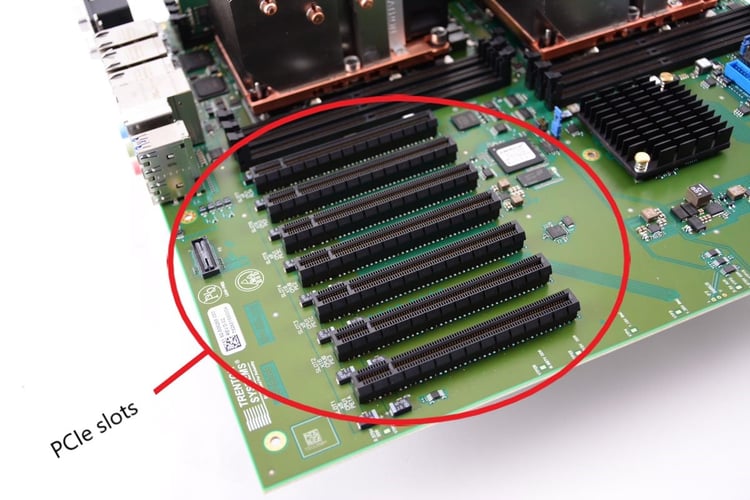
Understand The Full Concept of PCI-Express

PCIe Slots Shown Here

Introduction

If you've ever tried to add more than one graphics card to your computer, then you know that it can be an expensive and frustrating experience. The good news is that there's now an easy way to do this with PCIe-based expansion slots, which are available on most modern motherboards.

PCI-Express is the next generation of high-speed expansion slots.

PCI-Express is the next generation of high-speed expansion slots. It was introduced alongside the Unified Extensible Firmware Interface (UEFI) in 2004 and is used to connect high-performance devices such as graphics cards and hard drives to a computer's motherboard. The PCIe architecture provides a series of pins that can be shared within a computing system for multiple purposes, including power delivery, connectivity and communication between devices; this allows users access to additional bandwidth while also increasing overall performance.

It was introduced alongside the Unified Extensible Firmware Interface (UEFI) in 2004.

You may be wondering what the difference is between BIOS and UEFI. The answer lies in the standards that these two technologies use to communicate with each other.

The Unified Extensible Firmware Interface (UEFI) was introduced alongside the Unified Extensible Firmware Interface (UEFI) in 2004, when it was first recognized as a Draft Standard by International Organization for Standardization (ISO). It's also known as E12 or Embedded Controller Architecture (ECA), which stands for Embedded Controller Extension 12. This specification has been developed by Intel, Microsoft and Phoenix Technologies along with several other companies such as AMD/ATI Technologies and VIA Technologies.

The PCIe architecture provides a series of pins that can be shared within a computing system for multiple purposes.

PCI Express is a serial bus interface for connecting devices to a computer. It was introduced alongside the Unified Extensible Firmware Interface (UEFI) in 2004, and it has been developed since then to become one of the most common ways for connecting various types of devices to computers.

PCI Express works by using physical lanes on an expansion card; each lane can carry up to four data streams at 1GB/s each. Physical lanes are independent from other buses such as PCIe or DDR4, so you can use any combination of these technologies together via one card slot or multiple cards connected via either type of connection (means that you don't need special software drivers).

One of the most popular uses for this architecture is video capture, where multiple monitors are connected to one video card.

One of the most popular uses for this architecture is video capture, where multiple monitors are connected to one video card. The PCIe x16 (or x1) slot on your computer can be used as a primary display or as an audio card that provides integrated audio support.

The PCIe interface runs at speeds up to 4 gigabits per second (Gbps). This means it can transfer data at rates much faster than USB 3.0, which runs at 1 Gbps.

A PCI Express x16 slot will have four lanes (eight data lanes and two control lanes).

A PCI Express x16 slot will have four lanes (eight data lanes and two control lanes). A PCI Express x1 slot has only one lane. The advantage of using a legacy card is that you can use an old motherboard, but there are some disadvantages as well. The main disadvantage is that it will take longer for your computer to start up because there are more components on the motherboard than just memory and hard drives, which means more components need to be activated before they can start working properly; this can take up quite a bit of time when using older computers or laptops with slow processors or storage drives that aren't as fast as newer models running at higher speeds. You also have less room in terms of available memory compared to newer systems because there's no longer any room left over after installing all those extra components needed in order for everything else inside your computer system (like graphics cards)

An x4 slot will have four lanes (two data lanes and two control lanes).

An x4 slot will have four lanes (two data lanes and two control lanes). This is used for lower bandwidth devices like SSDs and is rated to support up to 4 GB/s of bandwidth.

The number of external ports available depends on the type of bus used in the PC (PCIe or PCIe Gen 2.) There are six PCIe Gen 1 slots on an R9 290X and five PCIe Gen 2 sockets on an R7 265, but only three Gen 1 sockets are available on an RX 480 as it uses a PCIe 3.0 connection and only two Gen 2 expansion slots on it as well as a single Gen 3 socket which is shared by all three card types. This means that an RX 480 has eight total external interfaces provided through two x16 slots, one x8 slot, one x4 slot and one single x1 or legacy PCI-E port depending on the motherboard being used with it.

PCI-Express is the next generation of high-speed expansion slots. It was introduced alongside the Unified Extensible Firmware Interface (UEFI) in 2004 and provides a series of pins that can be shared within a computing system for multiple purposes. These include:

  • Peripheral component interconnect (PCIe)

  • QuickPath Interconnect (QPI)

Conclusion

The general consensus is that PCIe Gen 2 is the future of expansion slots. It provides higher speeds, increased power efficiency and lower latencies than its predecessor. However, it's still not quite as fast as Thunderbolt 3 which can transfer data at up to 20Gbps (gigabits per second).

How to Create Stunning Graphics for Your Blog Using Canva


Introduction:

Are you looking for an easy and affordable way to create eye-catching graphics for your blog? Look no further than Canva! This free, user-friendly design tool is perfect for bloggers who want to create professional-looking graphics without hiring a designer. In this tutorial, we'll walk you through the steps of creating stunning graphics for your blog using Canva.

Step 1: Sign up for Canva and choose a template

First, create a free account on Canva.com. Then, choose a template that suits your needs. Canva has a wide variety of templates to choose from, including blog graphics, social media posts, and more.

Step 2: Customize your template

Once you've chosen a template, it's time to customize it to fit your brand. Canva makes this easy with its drag-and-drop interface. You can change the text, colors, and images to match your blog's style.

Step 3: Add your own images and text

Don't like the images provided in the template? No problem! Canva allows you to upload your own images and add your own text to your design. This is a great way to personalize your graphics and make them unique to your blog.

Step 4: Download and share your graphic

Once you're happy with your design, it's time to download it and share it on your blog and social media channels. Canva offers a variety of file types to choose from, including PNG, JPEG, and PDF.

Conclusion:

With Canva, creating stunning graphics for your blog has never been easier. By following these simple steps, you can create professional-looking graphics that will make your blog stand out from the crowd. So why not give it a try and take your blog's visuals to the next level?

6 Tips for Managing Your Digital Footprint and Online Reputation


In today's world, our digital footprint plays an important role in shaping our online reputation. Our digital footprint refers to the information that is available about us online, including our social media posts, comments, blog posts, and any other online activity. This information can be accessed by anyone, including potential employers, business partners, and even strangers. It's important to manage our digital footprint to ensure that we are presenting ourselves in the best possible light.

Here are some tips for managing your digital footprint:

  1. Google yourself: The first step in managing your digital footprint is to see what information is available about you online. Google your name and see what comes up. This will give you an idea of what others can see when they search for you.

  2. Clean up your social media profiles: Social media is one of the biggest sources of information about us online. Make sure your social media profiles are clean and professional. Remove any posts or photos that could be seen as offensive or inappropriate.

  3. Think before you post: Before you post anything online, think about how it will be perceived by others. Remember that anything you post online can be seen by anyone, so be careful about what you share.

  4. Use privacy settings: Make use of privacy settings on social media and other online platforms to control who can see your posts and activity. This can help you maintain more control over your digital footprint.

  5. Monitor your online activity: Keep an eye on what others are saying about you online. Set up Google alerts for your name and monitor your social media accounts for comments or mentions.

  6. Be proactive: In addition to managing your digital footprint, you can also be proactive in creating positive content about yourself online. Start a blog, write articles, or participate in online discussions to help build a positive online presence.


In conclusion, managing your digital footprint is an important part of maintaining a positive online reputation. By following these tips, you can ensure that you are presenting yourself in the best possible light online.

Advertisment

Popular Posts

Archive

Labels

Contact Us

Name

Email *

Message *